Code Review Agent with the Anthropic Python SDK
This guide walks through a concrete use case: a Code Management persona that reviews GitLab merge requests on demand, driven entirely from a Python script using the Anthropic SDK.
What you'll build:
| Component | Setting |
|---|---|
| Persona | Code Management |
| Inbound Authentication | Passthrough, Agent Access Key required |
| MCP tool | GitLab (SaaS only) |
| LLM | Anthropic, credential mode API Key, all models allowed |
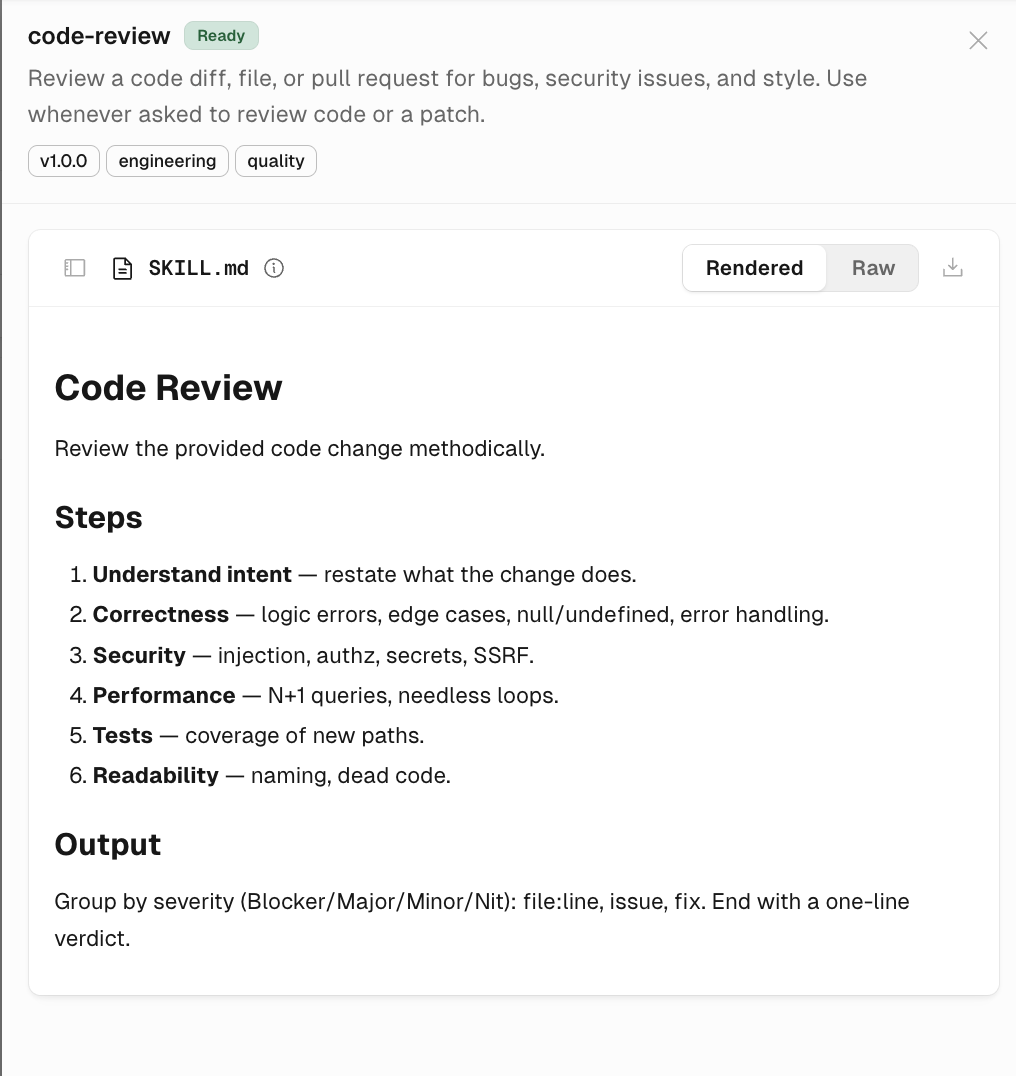
| Skill | code-review — reviews a diff, file, or pull request for bugs, security issues, and style |
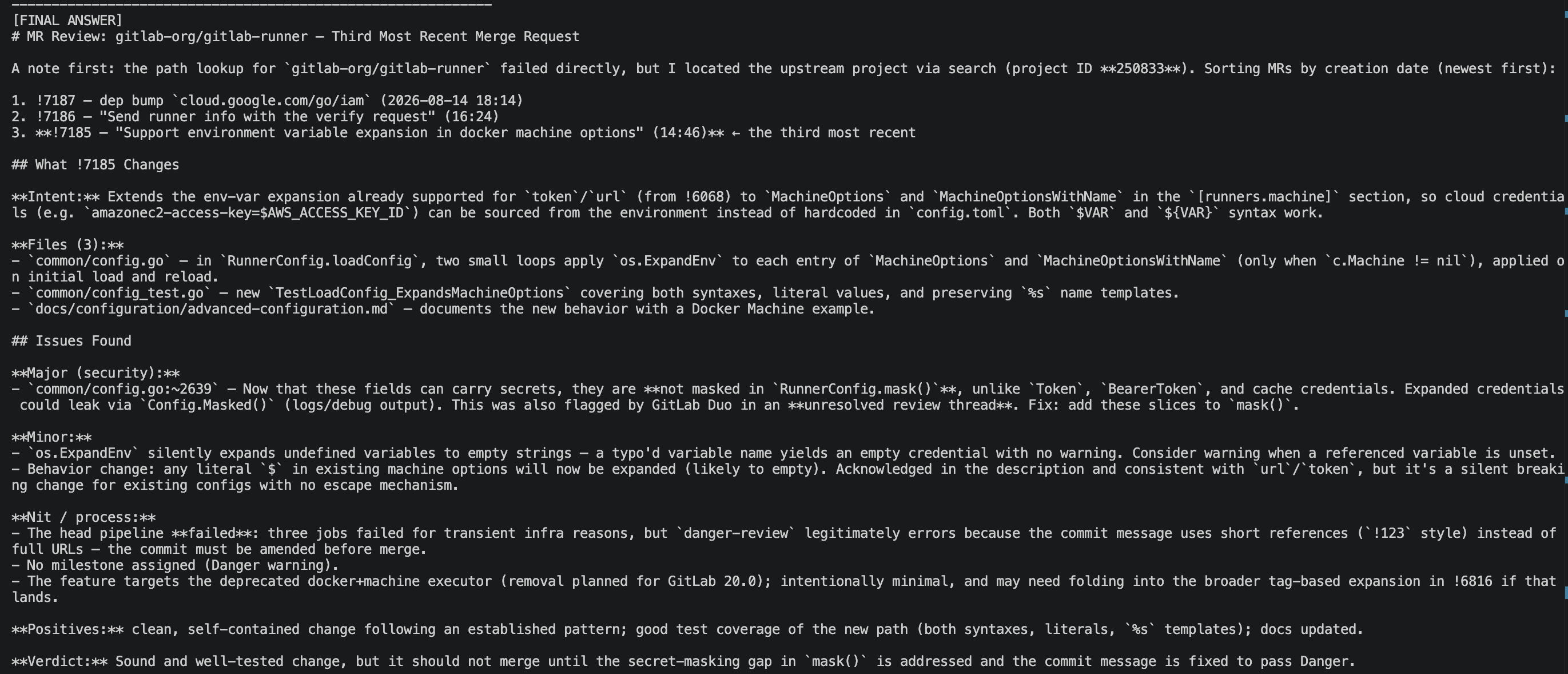
The end result: a single Python script that hands the model a real GitLab repo, lets it pull the third most recent merge request through the gateway-enforced GitLab tool, and returns a severity-graded review shaped by the code-review skill — no manual diff-pulling or copy-pasting into a chat window.
Prerequisites
- A Code Management persona already created in the AI Gateway, with:
- Inbound Authentication set to Passthrough (Agent Access Key required)
- The GitLab (SaaS only) MCP tool attached
- An Anthropic LLM Registry entry attached, credential mode API Key, with All models allowed
- The code-review skill attached
- An Agent Access Key generated from the persona's Connect flow
- Python with the
anthropicpackage installed (pip install anthropic)
If you haven't configured Passthrough authentication or attached an MCP tool yet, see Configuring Authentication for MCP Servers. To build the persona and skill this guide assumes, see Agent Personas and Skill Registry.
What this looks like in the portal
On the persona's Authentication tab, App Authentication shows the one MCP server this persona can reach:

And in the Skill Registry, the code-review skill — authored for this persona — is Ready to attach. Its SKILL.md defines the same review steps (understand intent, correctness, security, performance, tests, readability) the model follows in the walkthrough below.
The script
Because the LLM entry uses credential mode API Key, the gateway holds the Anthropic credential — your script only needs the Agent Access Key, sent as api_key. The persona's tools travel through mcp_servers, using the same key as authorization_token.
import anthropic

client = anthropic.Anthropic(
    base_url="https://<gateway-host>/p/<persona-id>/llm/<registry-entry-id>",
    api_key="<your-agent-access-key>"
)

TARGET_REPO = "gitlab-org/gitlab-runner"  # real, public, native GitLab project

prompts = [
    (
        f"Look at the GitLab project {TARGET_REPO} and find the third most recent merge request. "
        "Summarize what it changes, and call out any issues you find, or state that none were found."
    ),
]


def print_structured(response):
    for block in response.content:
        if block.type == "thinking":
            print("[THINKING]")
            print(block.thinking or "(redacted)")
        elif block.type == "mcp_tool_use":
            print(f"[TOOL CALL] {block.name} input={block.input}")
        elif block.type == "mcp_tool_result":
            status = "ERROR" if block.is_error else "OK"
            text = "".join(c.text for c in block.content if hasattr(c, "text"))
            print(f"[TOOL RESULT - {status}] {text[:500]}")
        elif block.type == "text":
            print("[FINAL ANSWER]")
            print(block.text)
        print("-" * 60)


for i, prompt in enumerate(prompts, start=1):
    print(f"\n{'=' * 20} PROMPT {i} {'=' * 20}")
    print(prompt)
    print()

    response = client.beta.messages.create(
        model="<model-id>",
        max_tokens=4096,
        messages=[{"role": "user", "content": prompt}],
        mcp_servers=[
            {
                "type": "url",
                "url": "https://<gateway-host>/p/<persona-id>",
                "name": "Code Management Persona",
                "authorization_token": "<your-agent-access-key>",
            }
        ],
        extra_headers={"anthropic-beta": "mcp-client-2025-04-04"},
    )

    print_structured(response)
print_structured walks the response's content blocks — thinking, mcp_tool_use, mcp_tool_result, text — so you see the model's tool calls and tool results along the way, not just its final answer.
Sample output
Running the script against gitlab-org/gitlab-runner produces a [FINAL ANSWER] block like this — the model found the merge request through the GitLab tool, then reviewed it following the code-review skill's steps:
Troubleshooting
anthropic.AuthenticationError: missing API key
The gateway saw no Agent Access Key on the model route. Check that api_key is set and non-empty — this entry's API Key mode looks for the Agent Access Key there, not an Anthropic key.
The model answers but never touches GitLab
Check the mcp_servers URL — it must be the persona root (/p/<persona-id>), not the /llm/... route. The model route and the tools socket are different endpoints on the same persona.
Where to find each value
| Placeholder | Where to find it |
|---|---|
<your-agent-access-key> | Generate from the persona's Connect flow. Plaintext is shown once. |
<gateway-host> | Host from the LLM Registry entry's Overview tab |
<persona-id> | The persona's ID on the Agent Persona page |
<registry-entry-id> | The LLM Registry entry's ID in the entry's URL |
<model-id> | Any model from the entry's Allowed Models list, for example claude-opus-5 |
TARGET_REPO | Swap for the public GitLab repo you want reviewed, e.g. gitlab-org/gitlab |
Related guides
- Configuring Authentication for MCP Servers — Passthrough, Agent Access Keys, and MCP tool grants in detail.
- Anthropic Python SDK — the general SDK reference this demo builds on, including the other credential modes.
Cequence AI Gateway